" height="48px" id="czyptE1Es" width="48px"/><path d="M 21.574 0 C 22.068 0 22.487 0.146 22.818 0.446 C 23.188 0.756 23.36 1.226 23.36 1.825 C 23.36 2.428 23.159 3.118 22.772 3.891 C 22.323 4.804 21.76 5.655 21.095 6.424 C 21.308 6.904 21.582 7.53 21.915 8.299 L 22.182 8.91 C 22.449 9.535 22.716 10.206 22.982 10.922 C 23.365 11.853 23.681 12.797 23.927 13.756 L 24.014 14.104 C 24.205 14.908 24.3 15.663 24.3 16.367 C 24.3 18.242 23.886 19.954 23.056 21.503 L 23.055 21.503 C 22.255 23.019 21.165 24.328 19.787 25.43 L 19.786 25.432 C 18.409 26.504 16.853 27.329 15.121 27.906 C 13.434 28.48 11.663 28.773 9.881 28.772 C 9.045 28.772 8.221 28.701 7.408 28.562 C 7.579 29.529 7.898 30.26 8.356 30.767 C 8.891 31.355 9.4 31.715 9.882 31.868 C 10.094 31.925 10.269 32 10.394 32.1 C 10.523 32.204 10.604 32.339 10.604 32.503 C 10.606 32.591 10.582 32.679 10.534 32.753 C 10.483 32.826 10.408 32.879 10.322 32.902 C 10.163 32.949 9.953 32.921 9.716 32.852 L 9.712 32.85 C 8.519 32.462 7.629 31.875 7.061 31.079 C 6.513 30.312 6.182 29.352 6.062 28.206 C 4.645 27.794 3.483 27.181 2.584 26.364 L 2.582 26.362 C 1.667 25.504 1 24.532 0.582 23.447 L 0.581 23.443 C 0.193 22.338 -0.003 21.175 0 20.003 C 0 18.677 0.249 17.431 0.749 16.267 L 0.749 16.265 C 1.262 15.122 1.98 14.083 2.865 13.197 C 3.717 12.309 4.73 11.592 5.85 11.084 C 6.929 10.565 8.11 10.294 9.308 10.294 C 10.385 10.294 11.344 10.459 12.182 10.793 L 12.487 10.913 C 13.13 11.179 13.677 11.513 14.126 11.912 C 14.988 11.027 15.869 10.16 16.769 9.314 C 17.611 8.526 18.42 7.704 19.196 6.852 C 19.031 6.351 18.876 5.846 18.731 5.339 L 18.73 5.332 C 18.589 4.731 18.519 4.116 18.521 3.5 C 18.521 2.379 18.859 1.502 19.554 0.895 C 20.225 0.308 20.899 0 21.574 0 Z M 19.587 8.116 C 18.89 8.856 18.169 9.572 17.426 10.265 C 16.603 11.061 15.793 11.87 14.996 12.691 C 15.554 13.273 15.97 13.893 16.235 14.555 C 16.511 15.235 16.653 15.961 16.655 16.694 C 16.655 17.701 16.402 18.665 15.9 19.585 L 15.899 19.586 C 15.395 20.482 14.681 21.208 13.76 21.765 C 12.861 22.326 11.798 22.603 10.576 22.603 C 10.212 22.603 9.849 22.576 9.49 22.521 C 9.155 22.468 8.823 22.396 8.497 22.306 C 8.195 23.033 7.927 23.883 7.696 24.857 C 7.465 25.834 7.333 26.71 7.297 27.486 C 7.634 27.577 7.971 27.649 8.308 27.697 L 8.307 27.697 C 8.693 27.75 9.083 27.777 9.473 27.778 C 11 27.778 12.49 27.403 13.942 26.65 C 15.388 25.904 16.689 24.905 17.784 23.701 C 18.889 22.489 19.654 21.214 20.082 19.876 L 20.083 19.873 C 20.568 18.419 20.81 16.869 20.81 15.223 C 20.807 13.999 20.685 12.777 20.446 11.575 L 20.446 11.572 C 20.241 10.402 19.954 9.247 19.587 8.116 Z M 10.167 11.657 C 9.215 11.657 8.3 11.906 7.422 12.411 C 6.566 12.92 5.788 13.589 5.09 14.421 C 4.394 15.247 3.823 16.171 3.395 17.162 L 3.395 17.164 C 2.964 18.131 2.71 19.069 2.63 19.976 C 2.63 20.087 2.615 20.208 2.59 20.339 L 2.59 20.698 C 2.59 21.554 2.71 22.426 2.952 23.312 L 3.05 23.627 C 3.288 24.349 3.646 25.025 4.11 25.628 L 4.325 25.877 C 4.814 26.401 5.407 26.815 6.067 27.094 C 6.139 26.205 6.285 25.324 6.506 24.46 L 6.506 24.456 L 6.507 24.456 C 6.768 23.516 7.055 22.638 7.367 21.821 C 6.882 21.521 6.503 21.146 6.236 20.692 C 5.952 20.21 5.806 19.721 5.806 19.226 C 5.806 18.278 6.199 17.561 6.983 17.096 L 7.101 17.035 C 7.216 16.981 7.342 16.953 7.469 16.952 C 7.592 16.952 7.712 16.975 7.804 17.044 C 7.904 17.119 7.946 17.229 7.946 17.348 C 7.946 17.548 7.811 17.75 7.616 17.945 L 7.612 17.948 L 7.607 17.951 C 7.23 18.278 7.046 18.674 7.046 19.145 C 7.046 19.743 7.309 20.239 7.856 20.636 C 8.548 19.094 9.406 17.633 10.415 16.277 L 10.813 15.752 C 11.635 14.675 12.504 13.634 13.418 12.632 C 12.902 12.263 12.381 12.017 11.852 11.897 L 11.843 11.896 C 11.298 11.738 10.734 11.657 10.167 11.656 Z M 14.288 13.453 C 13.276 14.568 12.323 15.734 11.432 16.946 C 10.452 18.275 9.618 19.706 8.945 21.214 C 9.264 21.291 9.593 21.328 9.922 21.323 C 10.809 21.326 11.677 21.064 12.415 20.571 C 13.209 20.044 13.877 19.349 14.372 18.535 C 14.877 17.713 15.128 16.855 15.128 15.958 C 15.126 15.502 15.046 15.049 14.891 14.62 L 14.888 14.612 C 14.76 14.193 14.556 13.8 14.288 13.453 Z M 21.86 1.076 C 21.665 1.076 21.406 1.238 21.081 1.67 C 20.639 2.267 20.417 2.984 20.417 3.827 C 20.417 4.263 20.489 4.689 20.635 5.109 C 21.046 4.539 21.412 3.937 21.727 3.309 C 21.914 2.935 22.031 2.621 22.082 2.367 L 22.083 2.357 L 22.084 2.357 C 22.164 2.064 22.201 1.833 22.201 1.662 C 22.201 1.429 22.161 1.28 22.103 1.193 C 22.053 1.118 21.98 1.076 21.86 1.076 Z" fill="rgb(255, 255, 255)" height="32.925060768879945px" id="oGcyViHv7" stroke-dasharray="" stroke-linecap="butt" stroke-linejoin="miter" stroke-miterlimit="10" stroke-width="0.4" stroke="rgb(255, 255, 255)" transform="translate(12 7.5)" width="24.300031668843673px"/></g></svg>)


Role & Context
Role: Sn. Product Designer
Product Area: Enterprise Workplace & Space Management
Primary Users: Workplace Admins, Facilities, IT
Scope: Global organizations with complex locations and hybrid work policies
The Problem
As organizations scale, booking policies become increasingly complex:
Different rules per location
Different permissions per team or role
Frequent exceptions for individuals
Need for bulk changes without breaking existing policies
Existing systems failed because:
Rules were tightly coupled to single locations or users
Exceptions required duplication
Admins couldn’t predict which rules applied when multiple overlapped
This led to:
Inconsistent employee experience
Meeting rooms and workspaces are often booked incorrectly or underused.
Managing these spaces requires significant administrative work and increases the risk of mistakes.
Goal
As organizations scale, booking policies become increasingly complex:
Different rules per location
Different permissions per team or role
Frequent exceptions for individuals
Need for bulk changes without breaking existing policies
Core Insight
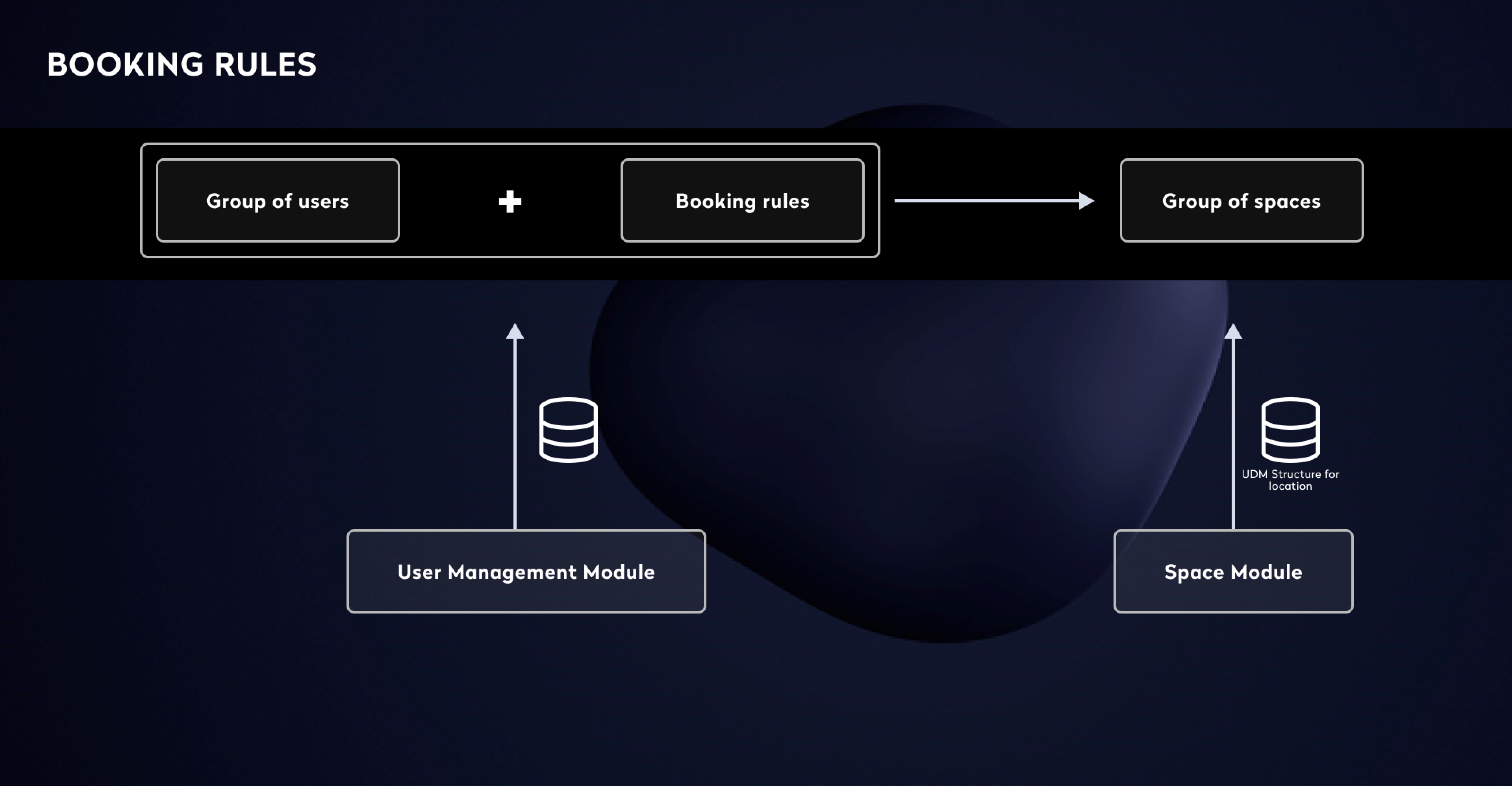
Admins think in terms of policy scope, not configuration steps:
Who → can book what → under which rules
The UI needed to reflect this mental model exactly, or the system would feel unpredictable.


Solution Overview
The solution is built around three explicit, always-visible components:
Spaces – where the rule applies
People – to whom the rule applies
Rules – what constraints are enforced
Each booking rule is a self-contained policy object that combines all three.
Entry Point: Booking Rules List
Why This Matters
Admins begin by reviewing an overview before jumping straight into creating something new.
Filters help narrow down results by:
Location
Org unit
Space type
The “New rule” option appears in context, rather than as a separate feature.
FAANG principle:
Focus on helping users understand the information before asking them to take action.
Rule Creation Pattern: Side Panel
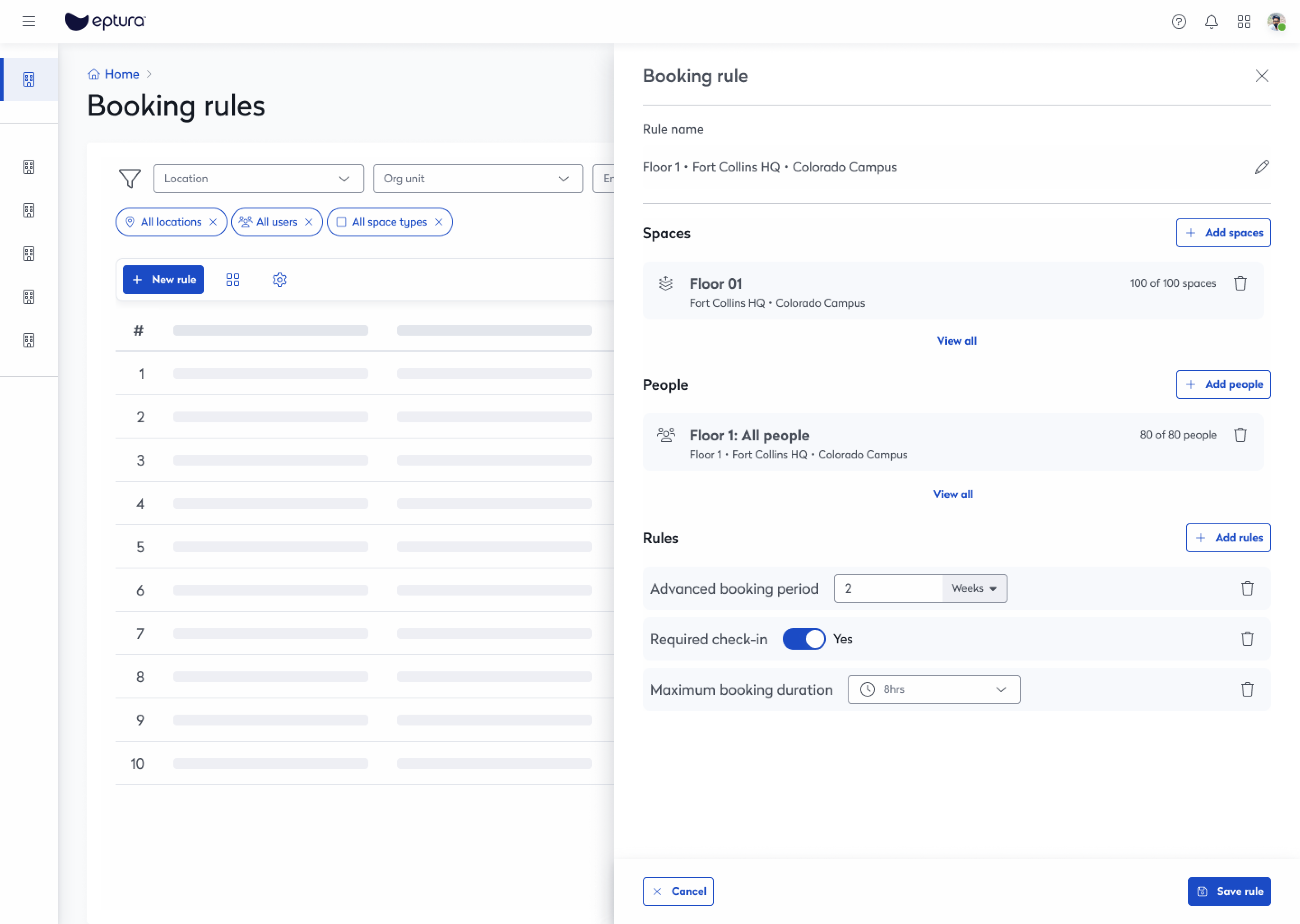
Why a Side Panel?
Keeps the context from the list clear
Enables rapid iteration across multiple rules
Helps prevent confusion that often happens with full-page forms
Admins can always see:
Selected spaces
Selected people
Active rules
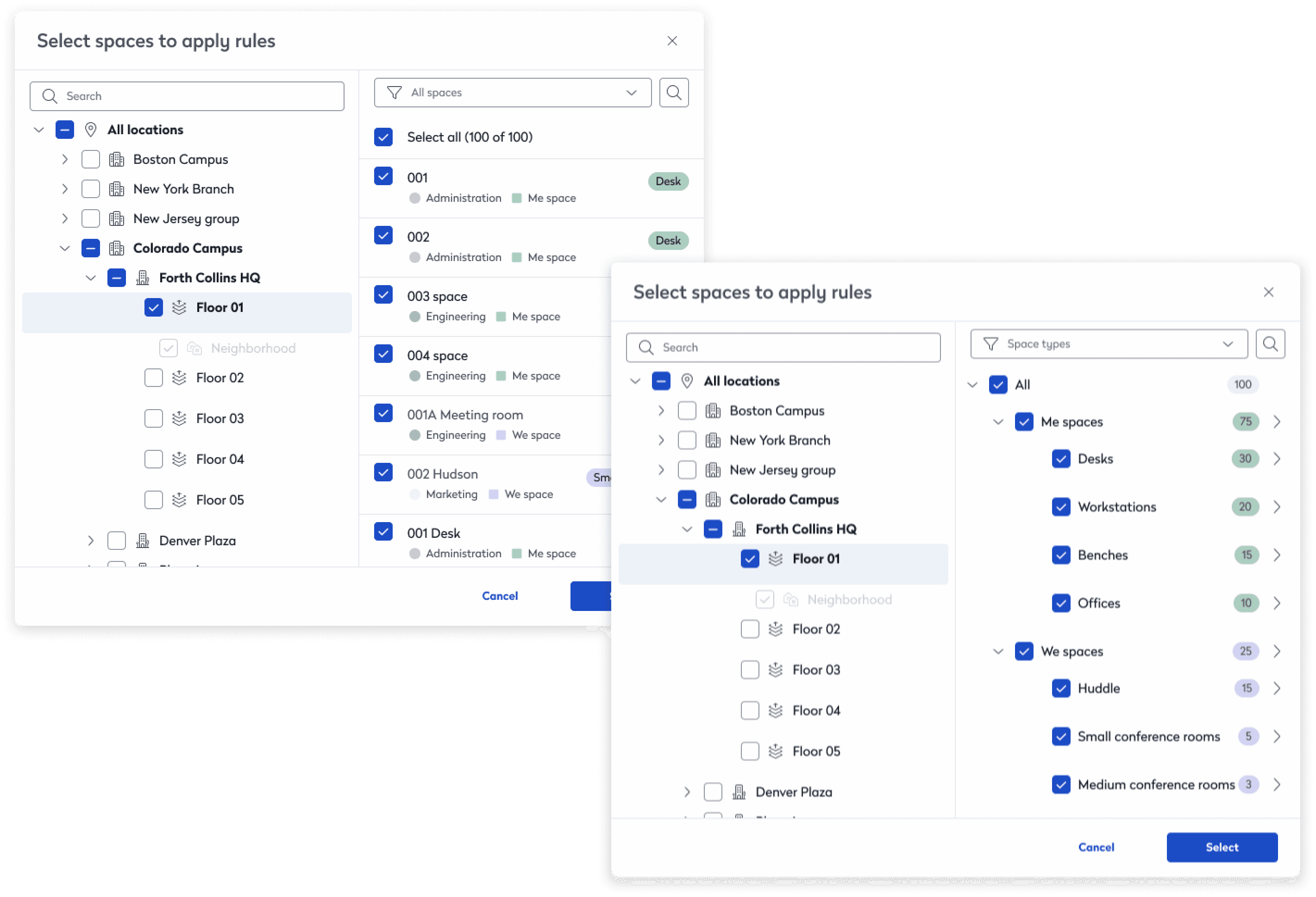
Step 1: Selecting Spaces (Where)
Design Decisions
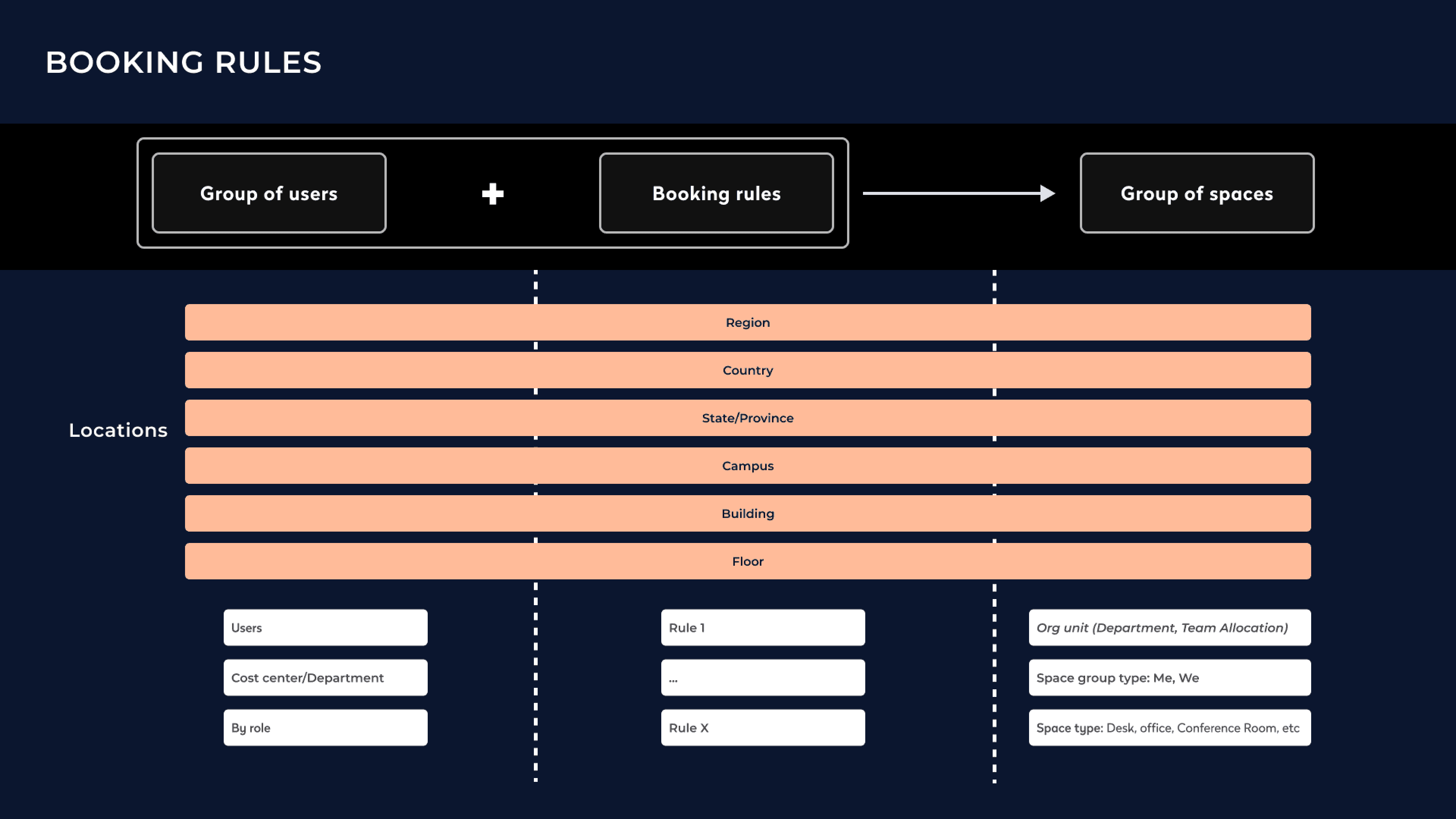
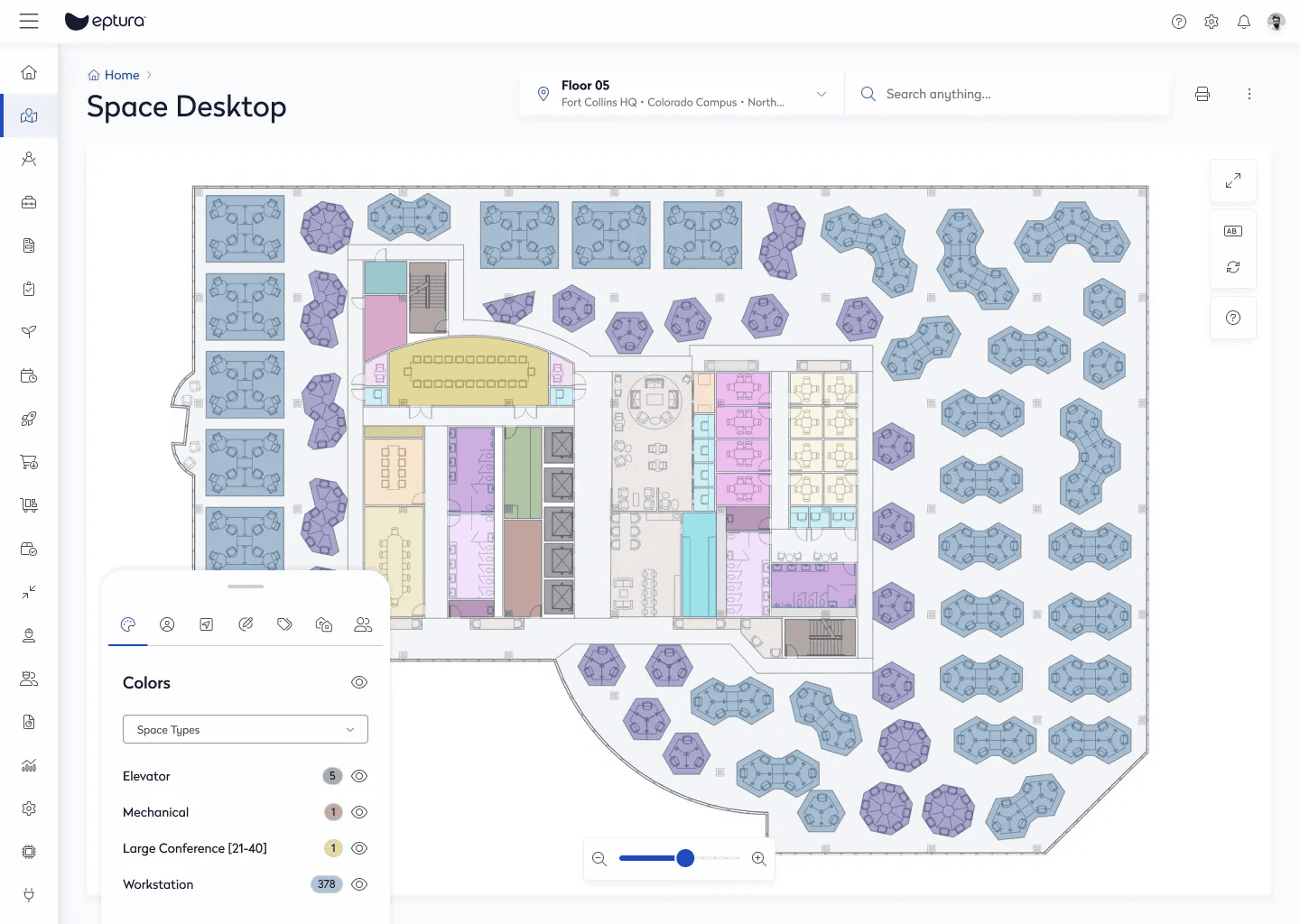
Hierarchical location tree (All locations → Floor)
Bulk selection at any level (campus, building, floor)
Visual indicators for:
Space type (Desk, Bench, Meeting room)
Ownership (Me / We)
Org unit
Why this works:
Mirrors how facilities teams think
Reduces selection errors
Makes bulk rules intentional and visible
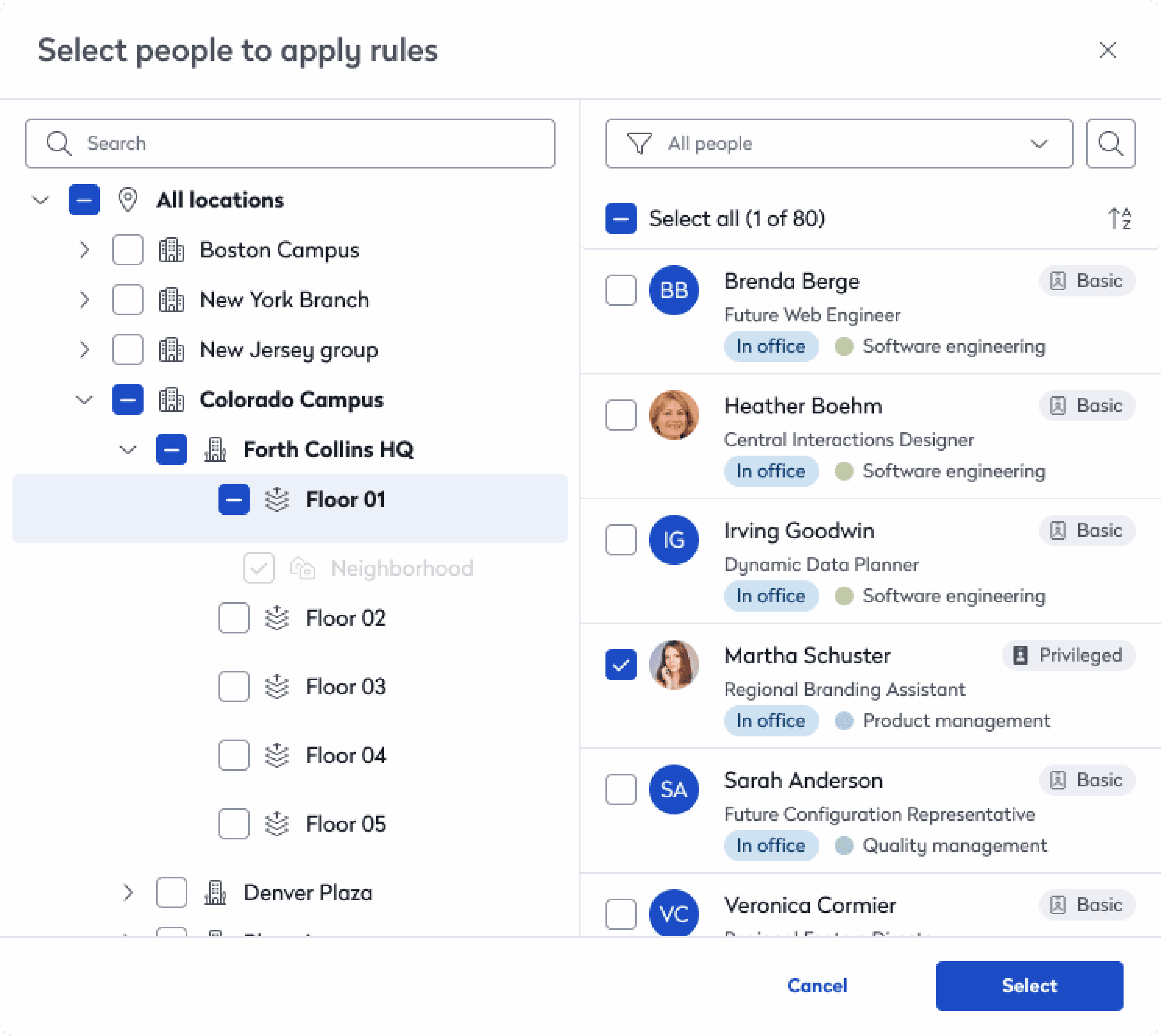
Step 2: Selecting People (Who)
Key Capabilities
Select:
All people on a floor
Individual users
Mixed selections
Role visibility (Basic vs Privileged)
Live counts (“80 of 80 people”)
Key UX safeguard:
Admins can quickly see the scope and impact.
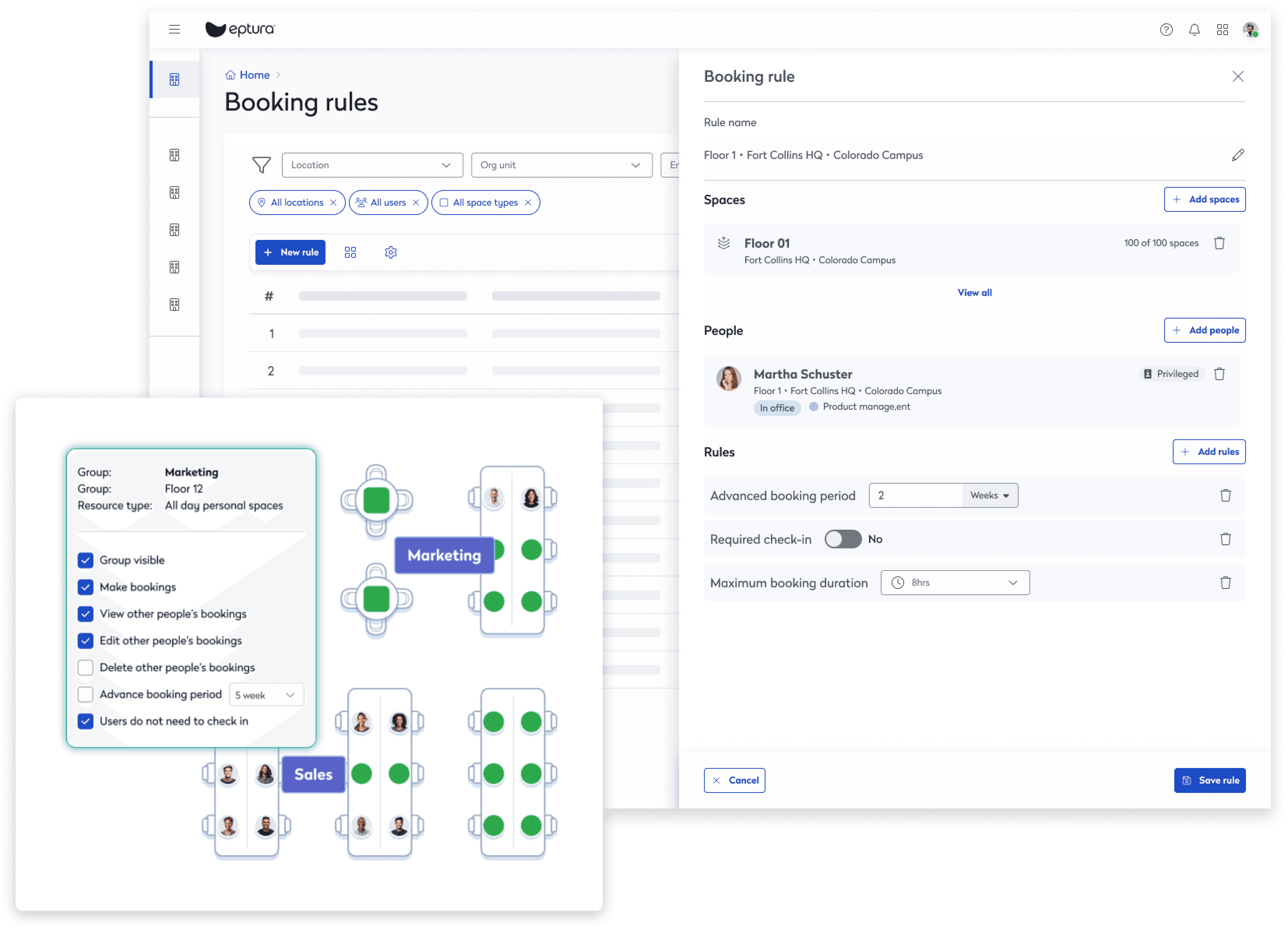
Step 3: Defining Rules (What)
Rule Design
Rules are:
Atomic (one concern per rule)
Composable
Independently removable
Examples:
Advanced booking window
Required check-in
Maximum booking duration
FAANG rationale:
Avoid compound logic → reduce cognitive and maintenance cost.
Bulk Rules vs Individual Overrides
Bulk Policy Example
All people on Floor 01 can book desks up to 2 weeks in advance.
Applied once
Affects dozens of users
Easy to audit and change
Individual Override Example
A specific user has required check-in disabled.
No duplication
No global rule breakage
Clear visual distinction
Rule Precedence (Predictability)
To eliminate ambiguity, rules follow a strict hierarchy:
Individual user rules
Group rules
Location-level rules
This is reinforced by:
UI ordering
Scope labels
Explicit selection context
Admins never need to “test and see” what happens.
Error Prevention & Safety Nets
Bulk Policy Example
Explicit impact counts
Clear remove actions for:
Spaces
People
Rules
Cancel vs Save separation
No destructive defaults
Design philosophy:
Admin mistakes should be hard to make and easy to undo.
Impact
Admin Efficiency
Setting up new locations now takes less time
Fewer duplicated rules
There is now less work for support teams
Employee Experience
Predictable booking behavior
Fewer denied or conflicting bookings
System Scalability
Helps the organization grow and adapt to changes in structure
You can add new rule types without redesigning the system.
What I’d Improve Next
help
Simulate rule conflicts to see what will happen before you save changes.
Visualize how rules are inherited in the system.
Track all changes with an audit log and change history.
Analyze how effective your rules are with built-in analytics.